
Impala JDBC 设置查询选项
介绍
Impala 支持标准 JDBC 接口,允许从商业的“商业智能”工具和用 Java 或其他编程语言编写的自定义软件访问。JDBC 驱动程序使您可以从您写入的 Java 程序、商业智能或使用 JDBC 与各种数据库产品进行通信的类似工具访问 Impala。
您可以使用 SET 语句指定查询选项,这些设置会影响该会话发出的所有查询。一些查询选项在日常操作中可用于提高易用性、性能或灵活性。其他查询选项控制 Impala 操作的特殊用途方面,主要用于高级调试或故障排除。
Note: 在 Impala 2.0 和更高版本中,您可以使用 SET 语句直接通过 JDBC 和 ODBC 界面设置查询选项。
我们可以在程序启动或者创建连接的时候指定默认查询选项,这些查询选项是会话级别的,有时我们需要针对特定 SQL 进行调优,动态设置查询选项(语句级的查询选项),这是支持细粒度调优必要条件。
本文介绍几种设置查询选项的方法。
环境配置:
CM: 6.3.1
Impala: 3.4
Impala JDBC: 2.6.17.1020
设置查询选项方法:
1. 通过 Coordinator 启动参数
| Flag | Description | Default | Current value | Experimental |
|---|---|---|---|---|
| default_query_options (string) | key=value pair of default query options for impalad, separated by ‘,’ | false |
CM 配置:
路径:群集-> Impala -> 配置 -> 搜索框输入“query_options”
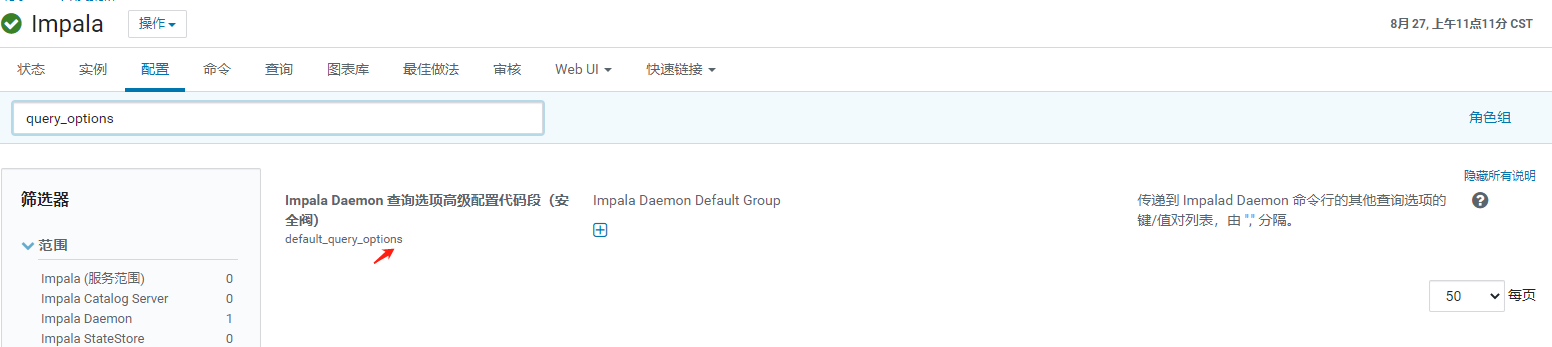
点击“+”,输入key=value对,由”,” 分隔。
使用脚本:
1
2
3
4
# 通过命令行指定
$IMPALA_HOME/sbin/impalad -default_query_options="xxx=xxx"
# 或者把参数放入配置文件,通过 --flagfile 指定。
$IMPALA_HOME/sbin/impalad --flagfile=/path/impalad_flags
2. 通过 JDBC 连接 URL
当连接到运行 Impala 2.0 或更高版本时,您可以使用驱动程序通过设置连接 URL 中的属性来将配置属性应用到服务。
例如,要将MEM_LIMIT查询选项设置为1 GB,将REQUEST_POOL查询选项设置为myPool,您将使用如下连接URL:
1
jdbc:impala://localhost:18000/default2;AuthMech=3;UID=cloudera;PWD=cloudera;MEM_LIMIT=1000000000;REQUEST_POOL=myPool
见 Cloudera-JDBC-Driver-for-Impala-Install-Guide 文档 Configuring Server-Side Properties 部分。
3. 通过 Admission Control 资源池
The
impala.admission-control.pool-default-query-optionssettings designates the default query options for all queries that run in this pool. Its argument value is a comma-delimited string of ‘key=value’ pairs, for example,'key1=val1,key2=val2'. For example, this is where you might set a default memory limit for all queries in the pool, using an argument such asMEM_LIMIT=5G.The
impala.admission-control.*configuration settings are available in Impala 2.5 and higher.
CM 中设置方法:
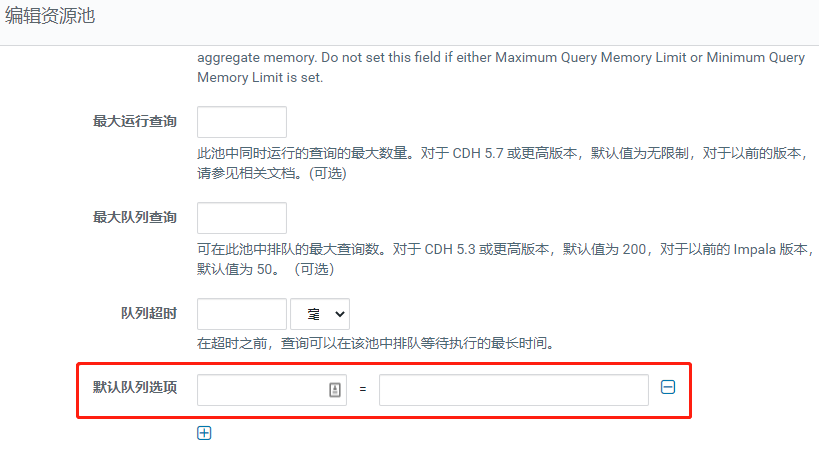
4. 通过 SQL 语句
1
2
3
4
# 设置队列
set request_pool=myPool;
# 查询语句
select 1;
如果设置的查询选项参数少还好,多的话得执行多次,每次只能设置一个参数。
Note: 设置后生效范围是 session,会影响整个会话的 SQL,使用了连接池的要注意,特别是某些参数是针对特定 SQL 调优。
样例:
1
2
3
4
5
6
7
8
9
10
11
12
13
14
15
16
17
18
19
20
21
22
23
24
25
26
27
28
29
30
31
32
33
34
35
36
37
38
39
40
41
42
43
44
45
46
47
48
49
50
51
52
53
54
55
56
57
import java.sql.Connection;
import java.sql.DriverManager;
import java.sql.ResultSet;
import java.sql.SQLException;
import java.sql.Statement;

public class ClouderaImpalaJdbcExample {

  // here is an example query based on one of the Hue Beeswax sample tables
  private static final String SQL_STATEMENT = "SELECT * FROM testload";

  private static final String CONNECTION_URL = "jdbc:impala://localhost:21050;AuthMech=3;UID=aaa;PWD=bbb";
  private static final String JDBC_DRIVER_NAME = "com.cloudera.impala.jdbc.Driver";

  public static void main(String[] args) {

    System.out.println("\n=============================================");
    System.out.println("Cloudera Impala JDBC Example");
    System.out.println("Using Connection URL: " + CONNECTION_URL);
    System.out.println("Running Query: " + SQL_STATEMENT);

    Connection con = null;

    try {
      Class.forName(JDBC_DRIVER_NAME);

      con = DriverManager.getConnection(CONNECTION_URL);

      Statement stmt = con.createStatement();
      // 设置查询参数,多个参数要执行多次
      stmt.execute("set request_pool='mypool'");
      // 执行查询语句
      ResultSet rs = stmt.executeQuery(SQL_STATEMENT);

      System.out.println("\n== Begin Query Results ======================");

      // print the results to the console
      while (rs.next()) {
        // the example query returns one String column
        System.out.println(rs.getString(1));
      }

      System.out.println("== End Query Results =======================\n\n");

    } catch (SQLException e) {
      e.printStackTrace();
    } catch (Exception e) {
      e.printStackTrace();
    } finally {
      try {
        con.close();
      } catch (Exception e) {
		// swallow
      }
    }
  }
}
以上几种方式比较适合公用查询选项调优和少量参数调优,如果系统中针对特定语句做了调优(如:RF 大小),那么其他语句未必有效,会增加了资源的消耗,如果想重置成默认状态,执行的语句又比较多,无意中增加了服务端的负载和代码的复杂度。上面几种设置的参数选项是全局或者会话级别,那有没有语句级别的,答案是有。
下面先了解其他客户端是怎么设置查询选项参数的。
5. 其他客户端
Impala Shell
您可以使用 Impala shell 工具 (impala-shell) 设置数据库和表、插入数据和发出查询。对于特殊查询和浏览,您可以通过交互式会话提交 SQL 语句。这里我们可以使用SET语句进行查询选项设置,其实SET语句并没有立即发送到服务端,在执行 SQL 的时候会随着语句一块发送到服务端。
1
2
3
4
5
6
[xxx.xxx.xxx.xxx:21000] default> set request_pool=root.mypool;set MT_DOP=1;
REQUEST_POOL set to root.mypool
MT_DOP set to 1
[xxx.xxx.xxx.xxx:21000] default> show databasese;
Query: show databases
...
下面是 impalad 的日志,注意看configuration参数:
1
2
3
4
5
6
7
8
9
10
下午6点31:30.649分  INFO    cc:53   query(): query=show databases
下午6点31:30.649分  INFO    cc:472  query: Query {
                                      01: query (string) = "show databases",
                                      03: configuration (list) = list<string>[3] {
                                        [0] = "CLIENT_IDENTIFIER=Impala Shell v3.2.0-cdh6.3.1 (3d5de68) built on Thu Sep 26 03:03:39 PDT 2019",
                                        [1] = "MT_DOP=1",
                                        [2] = "REQUEST_POOL=root.mypool",
                                      },
                                      04: hadoop_user (string) = "cydw",
                                    }
找到打印代码的地方:
1
2
3
4
5
6
7
8
9
10
11
12
13
14
15
/// ImpalaService rpcs: Beeswax API (implemented in impala-beeswax-server.cc)
void ImpalaServer::query(beeswax::QueryHandle& beeswax_handle, const Query& query) {
  VLOG_QUERY << "query(): query=" << query.query;
  RAISE_IF_ERROR(CheckNotShuttingDown(), SQLSTATE_GENERAL_ERROR);

  // ....
}

Status ImpalaServer::QueryToTQueryContext(const Query& query,
    TQueryCtx* query_ctx) {
  query_ctx->client_request.stmt = query.query;
  VLOG_QUERY << "query: " << ThriftDebugString(query);

  // ...
}
可以看到配置是封装在Query对象里,看configuration介绍。
// A Query
struct Query {
  1: string query;
  // A list of HQL commands to execute before the query.
  // This is typically defining UDFs, setting settings, and loading resources.
  3: list<string> configuration;

  // User and groups to "act as" for purposes of Hadoop.
  4: string hadoop_user;
}
impala-shell 使用的是 Beeswax API,看下 HiveServer2 API 是不是也有类似配置。
1
2
3
4
5
6
7
8
  /// ImpalaHiveServer2Service rpcs: HiveServer2 API (implemented in impala-hs2-server.cc)
void ImpalaServer::ExecuteStatement(TExecuteStatementResp& return_val,
    const TExecuteStatementReq& request) {
  VLOG_QUERY << "ExecuteStatement(): request=" << ThriftDebugString(request);
  HS2_RETURN_IF_ERROR(return_val, CheckNotShuttingDown(), SQLSTATE_GENERAL_ERROR);

  // ...
}
下面看下[TExecuteStatementReq](https://github.com/apache/impala/blob/branch-3.4.0/common/thrift/hive-1-api/TCLIService.thrift#L668)的定义,看confOverlay`介绍。
// ExecuteStatement()
//
// Execute a statement.
// The returned OperationHandle can be used to check on the
// status of the statement, and to fetch results once the
// statement has finished executing.
struct TExecuteStatementReq {
  // The session to execute the statement against
  1: required TSessionHandle sessionHandle

  // The statement to be executed (DML, DDL, SET, etc)
  2: required string statement

  // Configuration properties that are overlayed on top of the
  // the existing session configuration before this statement
  // is executed. These properties apply to this statement
  // only and will not affect the subsequent state of the Session.
  3: optional map<string, string> confOverlay

  // Execute asynchronously when runAsync is true
  4: optional bool runAsync = false
}
由此可以看出可以在提交statement是带上confOverlay参数就能实现 impala-shell 一样的效果,配置当前语句有效。
Hue
Hue 是通过 HiveServer2 API 接口与 Impala 交互。
hue.ini:
1
2
3
4
[impala]
server_host=xxx.xxx.xxx.xxx
server_port=21050
server_conn_timeout=120
下图是配置查询配置的方法:
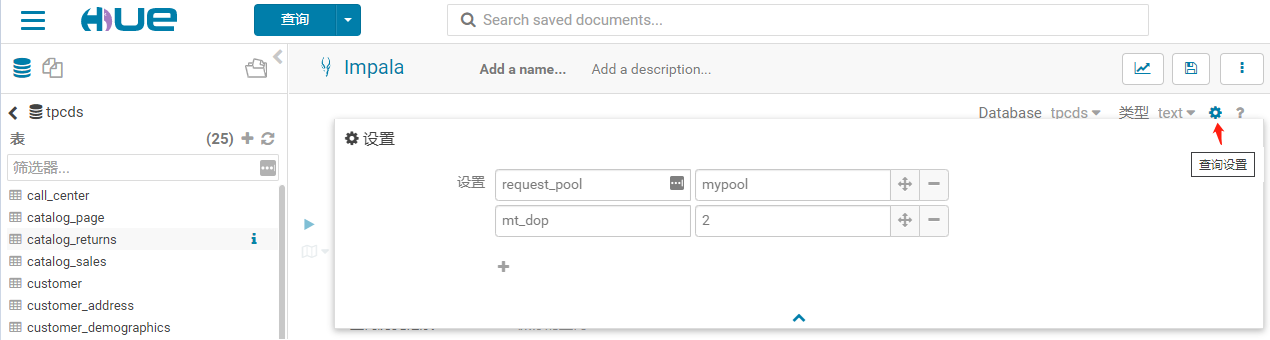
hue 的日志,注意看confOverlay参数:
1
DEBUG:root:Thrift call: <class 'ImpalaService.ImpalaHiveServer2Service.Client'>.ExecuteStatement(args=(TExecuteStatementReq(confOverlay={u'mt_dop': u'2', u'request_pool': u'mypool', 'impala.resultset.cache.size': '100000', 'QUERY_TIMEOUT_S': '300'}, sessionHandle=TSessionHandle(sessionId=THandleIdentifier(secret=LOG-REDACTED guid=8d45c402aeedf17d:e17b37d599f69893)), runAsync=True, statement='show tables'),), kwargs={})
impalad 的日志,注意看confOverlay参数:
下午6点30:58.315分	INFO	cc:231	TExecuteStatementReq: TExecuteStatementReq {
                                      01: sessionHandle (struct) = TSessionHandle {
                                        01: sessionId (struct) = THandleIdentifier {
                                          01: guid (string) = "}\xf1\xed\xae\x02\xc4E\x8d\x93\x98\xf6\x99\xd57{\xe1",
                                          02: secret (string) = "8UR\x81\xb8\vM\xc9\x83\x92\x87\xb7Q]\xa9s",
                                        },
                                      },
                                      02: statement (string) = "show tables",
                                      03: confOverlay (map) = map<string,string>[4] {
                                        "QUERY_TIMEOUT_S" -> "300",
                                        "impala.resultset.cache.size" -> "100000",
                                        "mt_dop" -> "2",
                                        "request_pool" -> "mypool",
                                      },
                                      04: runAsync (bool) = true,
                                    }
Hue 使用的是 TCLIService 接口,这个是使用 thrift 生成的。
TODO: 分析 hue 到 impalad 过程,日志,进度条等内容。
6. 动态设置查询选项
通过以上分析,我们知道 HiveServer2 接口可以支持语句级别的查询选项(通过confOverlay参数),能够支撑 SQL 细粒度的查询选项调优。
比如给每个 SQL 加上唯一标识(traceid),查询选项放到缓存redis(格式:tracdeid=map),提交语句时从 SQL 语句总提取traceid,再到 redis 中,查询选项配置,并把获取的配置加到TExecuteStatementReq.confOverlay。
/* traceid: xxxx */ select * from test;
下面介绍使用 AspectJ 实现的方案:
AspectJ 介绍
AspectJ 这里就不详细介绍了,请阅读 Intro to AspectJ Comparing Spring AOP and AspectJ。
AspectJ 提供了三种织入时机,分别为:
- Compile-time weaving:编译期织入,在编译的时候一步到位,直接编译出包含织入代码的 .class 文件。
- Post-compile weaving:编译后织入,增强已经编译出来的类,如我们要增强依赖的 jar 包中的某个类的某个方法。
- Load-time weaving:在 JVM 进行类加载的时候进行织入。
由于要织入驱动包中的类,显然第一种不合适,可以选第二、三种,下面分别介绍。
Compile-time weaving
我们开发大部分时候使用的是这个方式,请先阅读 使用 AOP 装配 AOP 了解 AOP 使用方式,这种方式是织入自己工程的类,第二种一般要织入非本项目的 jar。
Post-Compile Weaving
编译后织入(有时也称为二进制织入)用于织入现有的类文件和 JAR 文件。与编译期织入一样,aspects 可以用于源代码或二进制形式的织入。由于驱动包复杂,采用 .class 织入(从 jar 提取出要织入的文件到指定目录)。
可以使用 maven-dependency-plugin aspectj-maven-plugin 插件自动完成织入
Note Intellij 在 build 的时候会自己处理 AspectJ,而不是用我们配置的 maven 插件,不会自动织入。一定要用 mvn compile命令或者点击 Maven 窗口:Project -> Lifecycle -> compile。
首先,我们通过 Maven 引入 Spring 对 AOP 的支持:
1
2
3
4
5
<dependency>
    <groupId>org.springframework</groupId>
    <artifactId>spring-aspects</artifactId>
    <version>${spring.version}</version>
</dependency>
上述依赖会自动引入 AspectJ,使用 AspectJ 实现 AOP 比较方便,因为它的定义比较简单。
然后,我们定义一个HS2ClientAspect:
1
2
3
4
5
6
7
8
9
10
11
12
13
14
15
16
17
18
19
20
21
22
23
24
25
26
27
28
29
30
31
32
33
34
35
36
37
38
39
40
41
42
43
44
45
46
47
48
49
50
51
52
53
54
55
56
57
58
59
60
61
62
63
64
65
66
67
68
69
70
71
72
73
74
75
76
77
78
79
80
81
82
package com.cloudera.example.aspects;

import com.cloudera.example.helper.HS2ClientHelper;
import org.aspectj.lang.JoinPoint;
import org.aspectj.lang.ProceedingJoinPoint;
import org.aspectj.lang.annotation.AfterThrowing;
import org.aspectj.lang.annotation.Around;
import org.aspectj.lang.annotation.Aspect;
import org.aspectj.lang.annotation.Pointcut;
import org.slf4j.Logger;
import org.slf4j.LoggerFactory;

import java.util.Arrays;

/**
 * Aspect for HS2ClientWrapper.
 * <p>
 */
@Aspect
public class HS2ClientAspect {

  private final Logger log = LoggerFactory.getLogger(this.getClass());


  /**
   * Pointcut that matches method.
   */
  @Pointcut("execution(public * com.cloudera.impala.hivecommon.api.HS2ClientWrapper" +
      ".ExecuteStatement(..))")
  public void hs2Pointcut() {
    // Method is empty as this is just a Pointcut, the implementations are in the advices.
  }


  /**
   * Advice that hs2 methods throwing exceptions.
   *
   * @param joinPoint join point for advice.
   * @param e exception.
   */
  @AfterThrowing(pointcut = "hs2Pointcut()", throwing = "e")
  public void hs2AfterThrowing(JoinPoint joinPoint, Throwable e) {
    log.error("Exception in {}.{}() with cause = {}",
        joinPoint.getSignature().getDeclaringTypeName(),
        joinPoint.getSignature().getName(), e.getCause() != null ? e.getCause() : "NULL");
  }

  /**
   * Advice that hs2 api when a method is entered and exited.
   *
   * @param joinPoint join point for advice.
   * @return result.
   * @throws Throwable throws {@link IllegalArgumentException}.
   */
  @Around("hs2Pointcut()")
  public Object hs2Around(ProceedingJoinPoint joinPoint) throws Throwable {
    if (log.isDebugEnabled()) {
      log.debug("Enter: {}.{}() with argument[s] = {}",
          joinPoint.getSignature().getDeclaringTypeName(),
          joinPoint.getSignature().getName(), Arrays.toString(joinPoint.getArgs()));
    }

    try {
      // before,add query option action
      // ....
      // procee
      Object result = joinPoint.proceed();
      if (log.isDebugEnabled()) {
        log.debug("Exit: {}.{}() with result = {}",
            joinPoint.getSignature().getDeclaringTypeName(),
            joinPoint.getSignature().getName(), result);
      }
      return result;
    } catch (IllegalArgumentException e) {
      log.error("Illegal argument: {} in {}.{}()", Arrays.toString(joinPoint.getArgs()),
          joinPoint.getSignature().getDeclaringTypeName(),
          joinPoint.getSignature().getName());

      throw e;
    }
  }
}
紧接着,为了编译流程自动化需要以下插件
1
2
3
4
5
6
7
8
9
10
11
12
13
14
15
16
17
18
19
20
21
22
23
24
25
26
27
28
29
30
31
32
33
34
35
36
37
38
39
40
41
42
43
44
45
46
47
48
49
50
51
52
53
54
55
56
57
58
59
60
61
62
63
64
65
66
67
68
<!-- Unzip the classes to be woven from the JAR and do so before compiling -->
<plugin>
    <groupId>org.apache.maven.plugins</groupId>
    <artifactId>maven-dependency-plugin</artifactId>
    <executions>
        <execution>
            <id>unpack</id>
            <phase>generate-sources</phase>
            <goals>
                <goal>unpack</goal>
            </goals>
            <configuration>
                <artifactItems>
                    <artifactItem>
                        <groupId>Impala</groupId>
                        <artifactId>ImpalaJDBC${jdbc.version}</artifactId>
                        <version>${impala.jdbc.version}</version>
                        <type>jar</type>
                        <includes>com/cloudera/impala/hivecommon/api/HS2*ClientWrapper*.*</includes>
                        <outputDirectory>${project.build.directory}/unwoven-classes</outputDirectory>
                    </artifactItem>
                </artifactItems>
            </configuration>
        </execution>
    </executions>
</plugin>
<plugin>
    <groupId>org.codehaus.mojo</groupId>
    <artifactId>aspectj-maven-plugin</artifactId>
    <version>1.11</version>
    <configuration>
        <complianceLevel>1.8</complianceLevel>
        <verbose>true</verbose>
        <!-- Weaving already compiled classes -->
        <weaveDirectories>
            <weaveDirectory>${project.build.directory}/unwoven-classes</weaveDirectory>
        </weaveDirectories>
        <aspectLibraries>
            <aspectLibrary>
                <groupId>org.springframework</groupId>
                <artifactId>spring-aspects</artifactId>
            </aspectLibrary>
        </aspectLibraries>
    </configuration>
    <dependencies>
        <dependency>
            <groupId>org.aspectj</groupId>
            <artifactId>aspectjtools</artifactId>
            <version>${aspectj.version}</version>
        </dependency>
        <dependency>
            <groupId>org.aspectj</groupId>
            <artifactId>aspectjrt</artifactId>
            <version>${aspectj.version}</version>
        </dependency>
    </dependencies>
    <executions>
        <execution>
            <!-- Compile and weave aspects after all classes compiled by javac -->
            <!--                        <phase>process-classes</phase>-->
            <goals>
                <goal>compile</goal>
                <goal>test-compile</goal>
            </goals>
        </execution>
    </executions>
</plugin>
</plugins>
执行编译:mvn clean compile
编译后classes应该有这个类,这是织入处理之后的类,
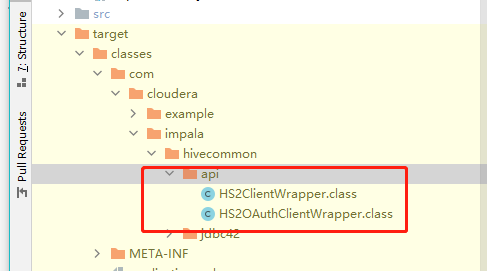
反编译后找到ExecuteStatement方法,方法已被修改。
1
2
3
4
5
6

  public TExecuteStatementResp ExecuteStatement(TExecuteStatementReq arg0) throws TException {
    JoinPoint var3 = Factory.makeJP(ajc$tjp_0, this, this, arg0);
    return (TExecuteStatementResp)ExecuteStatement_aroundBody1$advice(this, arg0, var3, HS2ClientAspect.aspectOf(), (ProceedingJoinPoint)var3);
  }
Load-time weaving
它是在 JVM 加载类的时候做的织入。根据文档 LTW Configuration 里面提到了三种实现方式,其中第一种,基于 agent,启动时添加-javaagent参数;第二种,使用了专有命令来执行;第三种,就是自定义classloader的方式。
本文使用 spring boot 环境,非容器环境,则主要靠 java instrumentation 技术实现,这种就要加 javaagent,可以直接使用 aspectjweaver.jar;也可以直接使用 spring-instrumentation.jar。
当使用 spring 的 context:load-time-weaver 时,如果是在非容器环境下,其实就是使用的 spring-instrumentation.jar。
When class instrumentation is required in environments that do not support or are not supported by the existing
LoadTimeWeaverimplementations, a JDK agent can be the only solution. For such cases, Spring providesInstrumentationLoadTimeWeaver, which requires a Spring-specific (but very general) VM agent,org.springframework.instrument-{version}.jar(previously namedspring-agent.jar).To use it, you must start the virtual machine with the Spring agent, by supplying the following JVM options:
-javaagent:/path/to/org.springframework.instrument-{version}.jarNote that this requires modification of the VM launch script which may prevent you from using this in application server environments (depending on your operation policies). Additionally, the JDK agent will instrument the entire VM which can prove expensive.
For performance reasons, it is recommended to use this configuration only if your target environment (such as Jetty) does not have (or does not support) a dedicated LTW.
当 class instrumentation 需要时,JDK agent 就是唯一选择。此时 spring 提供了InstrumentationLoadTimeWeaver,这时需要指定一个 agent,org.springframework.instrument-{version}.jar。这样就会需要修改 VM 的启动脚本。agent 会 instrument 整个 VM,代价高昂。为了性能考虑,推荐只有在不得不使用时,才使用这种方式。
先注释掉之前在 pom.xml 中用于编译后织入使用的插件,免得影响测试。
文件:
我们需要在 resources 中配置 aop.xml 文件,放置在 META-INF 目录中(resource/META-INF/aop.xml):
1
2
3
4
5
6
7
8
9
10
11
12
13
14
15
16
17
18
19
20
21
22
<?xml version="1.0" encoding="UTF-8"?>
<!DOCTYPE aspectj PUBLIC "-//AspectJ//DTD//EN" "http://www.eclipse.org/aspectj/dtd/aspectj.dtd">
<aspectj>

    <!-- Add this argument to options to make AspectJ logs use the Spring logging framework. -->
    <!-- -XmessageHandlerClass:org.springframework.aop.aspectj.AspectJWeaverMessageHandler -->
    <weaver options="-verbose -showWeaveInfo">
        <!--
            Only weave classes in our application-specific packages.
            This should encompass any class that wants to utilize the aspects,
            and does not need to encompass the aspects themselves.
        -->
        <include within="com.cloudera.example.aspects.*"/>
        <include within="com.cloudera.impala.hivecommon.api..*"/>
    </weaver>

    <aspects>
        <!-- declare aspects to the weaver -->
        <aspect name="com.cloudera.example.aspects.HS2ClientAspect"/>
    </aspects>

</aspectj>
配置类:
1
2
3
4
5
6
@Configuration
@EnableAspectJAutoProxy
@EnableLoadTimeWeaving(aspectjWeaving = AspectJWeaving.AUTODETECT)
public class AspectConfiguration {

}
方便跑测试的话。我们往使用 surefire 插件中加上 javaagent:
pom.xml:
1
2
3
4
5
6
7
8
9
10
11
12
13
<plugin>
    <groupId>org.apache.maven.plugins</groupId>
    <artifactId>maven-surefire-plugin</artifactId>
    <version>2.10</version>
    <configuration>
        <argLine>
               -javaagent:"${settings.localRepository}\org\aspectj\aspectjweaver\${aspectj.version}\aspectjweaver-${aspectj.version}.jar"
               -javaagent:"${settings.localRepository}\org\springframework\spring-instrument\${spring.version}\spring-instrument-${spring.version}.jar"
         </argLine>
        <useSystemClassLoader>true</useSystemClassLoader>
        <forkMode>always</forkMode>
    </configuration>
</plugin>
更多信息和其他两种实现方式可以参考 曹工说Spring Boot源码(13)– AspectJ的运行时织入(Load-Time-Weaving)
todo:代码整理放到 Github。
小结
本文分析了使用 impala 查询选项方法,可以设置默认,也可以针对语句设置优化后的查询选项,最后介绍了在使用 jdbc 驱动的时候如何设置查询选项,更方便的优化 sql 提升性能。
留下评论